
VPC
Alibaba Cloud VPC network planning, CIDR block design, and ACK cluster networking best practices
CIDR Block Planning Overview
1) Purpose of CIDR Block Planning
Easy to view and manage, similar to IP planning for one or more IDC data centers -- you can immediately identify ownership based on IP addresses.
Facilitates network and routing determination within the same cluster/VPC, as well as network isolation policies (whitelists).
Distinguishes multiple VPC/network environments, making it easy to differentiate subnet CIDR blocks when establishing network connectivity.
2) Standardized Design Approach
First, you need to distinguish between two categories -- whether there are cluster-type resources such as ACK that require separate planning:
If there are no cluster resources (i.e., only conventional resources like RDS, ECS, etc.), simply define the VPC and vSwitches using standard private network CIDR blocks.
If there are cluster resources, it is best to allocate separate vSwitches for deploying conventional resources and dedicated vSwitches for deploying cluster resources.
Since production deployments, and the future trend in general, will mostly exist in cluster form on the cloud, we only discuss the second approach. CIDR block design specifications:
Private CIDR blocks available for VPC: 192.168.0.0/16, 10.0.0.0/8, 172.16.0.0/12 and their subnets. Each VPC can only specify one CIDR block.
CIDR blocks available for vSwitches: must be a subset of (<=) the VPC CIDR block.
Number of VPCs: Use different CIDR blocks when creating multiple VPCs.
Number of clusters: Use different CIDR blocks when deploying multiple clusters under the same account.
When ACK cluster resources exist, determine the cluster network plugin mode:
When not using the Terway plugin, three private CIDR blocks are needed, e.g.: 10.1.0.0/16 (VPC-vswitch), 192.168.0.0/24 (for Pods), 192.168.10.0/24 (for Services).
When using the Terway plugin, two private CIDR blocks are needed, e.g.: 10.16.0.0/8 (VPC-vswitch + Pod), 192.168.0.0/24 (for Services).
Personal Recommendations
Under the same account (same environment), use 192.168.0.0/16, 10.0.0.0/0, 172.16.0.0/12 to create VPCs and build the network.
Use sub-vSwitches to separate different clusters and cloud product resources.
Use cloud product whitelists or other network plugins for network isolation policies.
Different accounts (e.g., development, production) can reuse the same CIDR blocks for networking (cross-environment calls generally do not exist).
Current environment networking information (it is recommended to use the Terway plugin going forward):
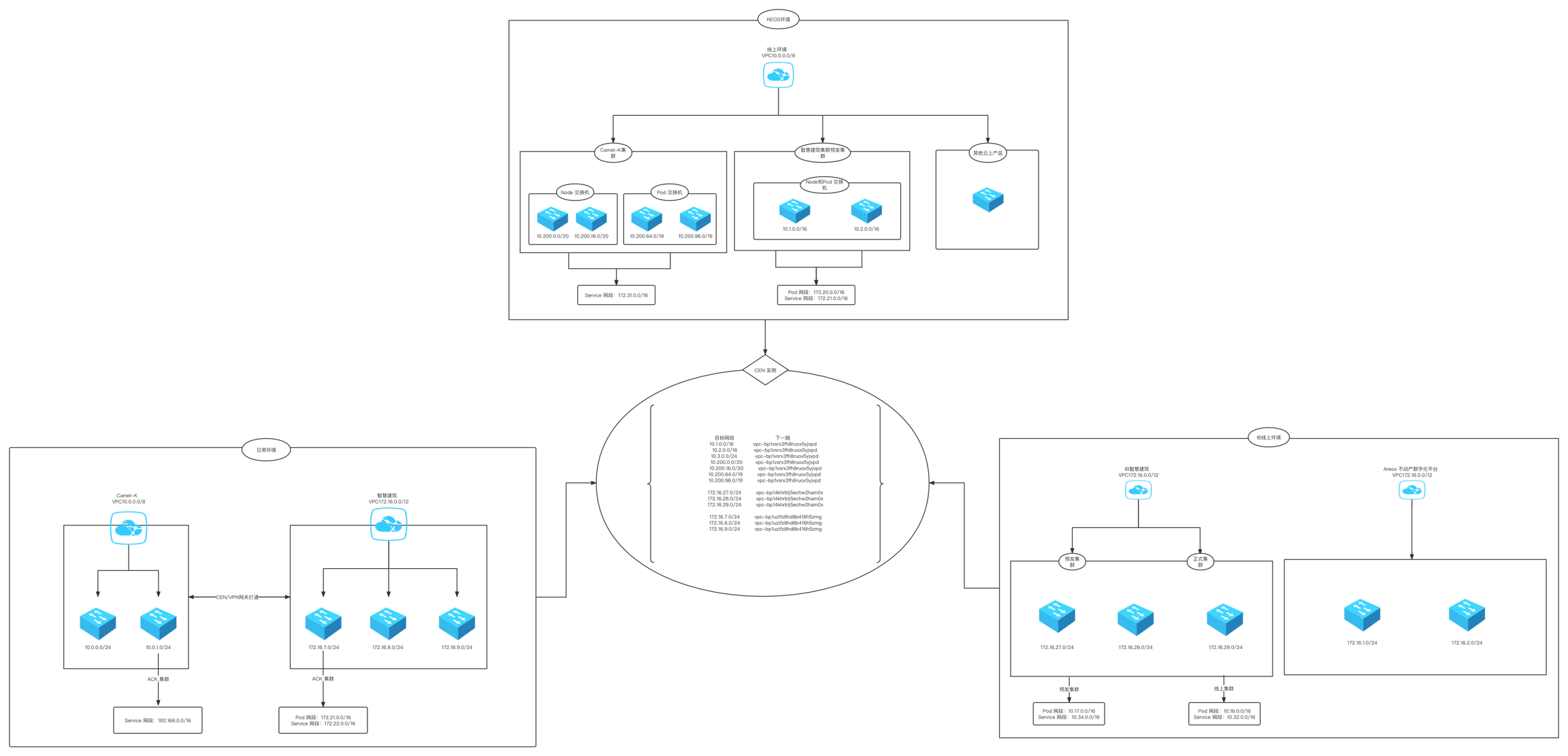
Development environment network architecture
Production network architecture (isolation between clusters and between clusters and cloud products is achieved through private vSwitch CIDR blocks)
Production Case Studies
1) Case 1
VPC: 10.0.0.0/8 (reusing the production VPC)
vSwitches: Create 4 new vSwitches
test-swc-10_200_0_0_20 (Availability Zone 1)
test-swc-10_200_16_0_20 (Availability Zone 2)
test-swc-10_200_64_0_19 (Availability Zone 1)
test-swc-10_200_96_0_19 (Availability Zone 2)
Cluster CIDR Planning
Node CIDR:
10.200.0.0/20
10.200.16.0/20
Pod CIDR:
10.200.64.0/19
10.200.96.0/19
Service CIDR: - 172.31.0.0/16
Note:
If high availability across different availability zones is required for Node and Pod vSwitches, each availability zone must have vSwitches available for both Nodes and Pods.
The Service CIDR block must not overlap with the VPC CIDR block or CIDR blocks used by existing Kubernetes clusters within the VPC.
2) Related Documentation and Tools
VPN Gateway Principles and Operations:
Architecture Diagram
Last updated